


Skip to content
View in the app

A better way to browse. Learn more.

OCWFED

A full-screen app on your home screen with push notifications, badges and more.

To install this app on iOS and iPadOS
  1. Tap the Share icon in Safari
  2. Scroll the menu and tap Add to Home Screen.
  3. Tap Add in the top-right corner.
To install this app on Android
  1. Tap the 3-dot menu (⋮) in the top-right corner of the browser.
  2. Tap Add to Home screen or Install app.
  3. Confirm by tapping Install.

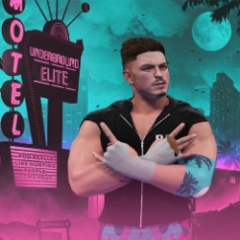
[OFFICIAL STATEMENT] – Injury Update on Gabriel Vincent Following Road2Glory Incident
Featured Replies

Following the shocking events that unfolded during OCW Road2Glory event, the wrestling world was left stunned after the revelation that Eddie Ramos — Gabriel Vincent’s longtime partner and friend — was, in fact, A.C. Cobra, the mysterious attacker who had been targeting members of Underground Elite in recent months.


During a live in-ring segment, both Gabriel Vincent and Eddie Ramos came out to confront the mysterious assailant, demanding he reveal himself. Suddenly, the arena went dark. When the lights returned, A.C. Cobra was standing behind Gabriel with a steel chair and launched a vicious assault.


Gabriel Vincent sustained multiple injuries during the attack and was immediately evaluated by our medical personnel on-site before being transported to a nearby medical facility for further testing. At this time, his exact condition remains unclear, and we cannot provide an official timetable for his return to in-ring competition.


While we hope for a full recovery, there is growing concern internally that Gabriel Vincent may be forced to miss Wrestlelution 19.


We will continue to provide updates as they become available. Our thoughts are with Gabriel during this difficult time.


— OCW Management

file1.png

Account

Navigation

Configure browser push notifications

Chrome (Android)
  1. Tap the lock icon next to the address bar.
  2. Tap Permissions → Notifications.
  3. Adjust your preference.
Chrome (Desktop)
  1. Click the padlock icon in the address bar.
  2. Select Site settings.
  3. Find Notifications and adjust your preference.
